Can staff see purchase history at the counter?
Checkout shows the customer and points balance. Fuller history is in the dashboard when you need it.
Loyalty Programs for boutiques and clothing stores
Attach a customer at the counter, apply points and configured rewards, and review loyalty activity in the dashboard. Staff see balances at checkout — not full purchase history at the register.

Common friction
Three problems boutiques and clothing stores run into with loyalty programs.
Regulars expect you to remember them, but paper punch cards get lost.
Staff are not sure how many points someone has without leaving the counter.
Reward rules live in a notebook instead of one place the whole team shares.
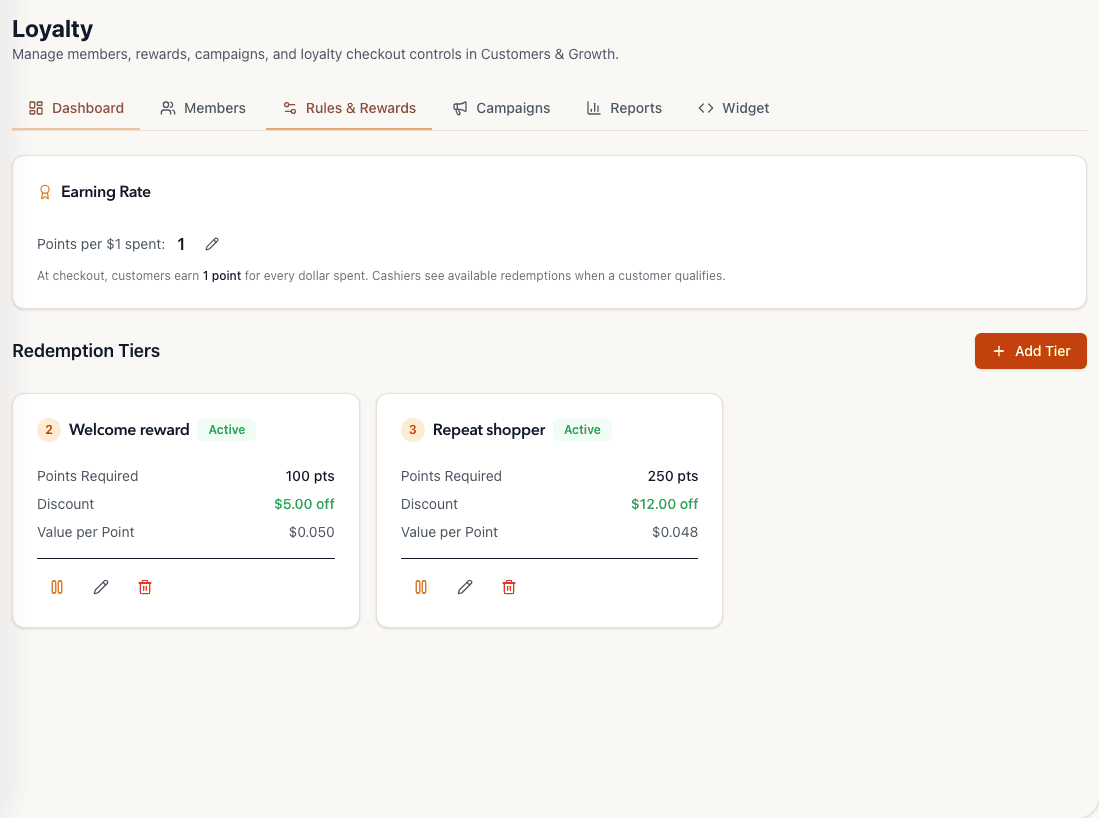
Tillr Rules & Rewards view showing a one-point-per-dollar earning rate and two redemption rules.
How it works
Plain steps your team can follow at the counter or in the dashboard.
Set earn rates and reward thresholds in the loyalty dashboard.
Attach the customer at checkout and apply points or a configured reward.
Review loyalty summaries in reporting when planning the next promotion.
Shop scenario
A regular buys a scarf. Staff attach her profile, apply earned points toward the purchase, and send a receipt by text when that channel is set up.
Questions
Checkout shows the customer and points balance. Fuller history is in the dashboard when you need it.
Customer groups and targeted discounts can be configured where your store uses them.
Add a few sample products, try the feature, and decide whether it fits your shop.