Can Tillr track sizes and colors separately?
Yes, when each size and color is set up as a separate SKU with inventory tracking. The option matrix does not create or group variants.
Inventory Management for boutiques and clothing stores
Give each size and color a separate SKU. Completed sales update stock for inventory-tracked items; the option matrix does not create or group product variants.

Common friction
Three problems boutiques and clothing stores run into with inventory management.
Similar sizes and colors are easy to mix up at checkout.
A returned item needs to be matched to its original sale.
Popular sizes need a stock check before the next vendor order.
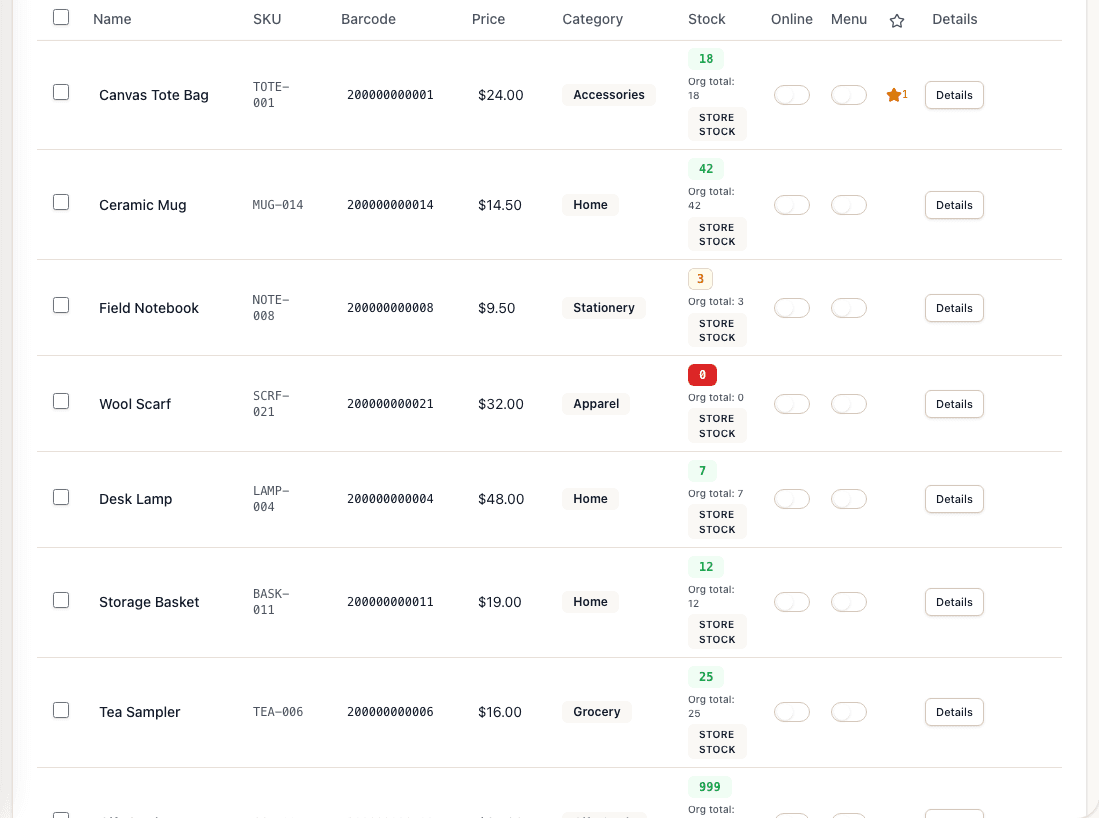
Tillr products list with names, SKUs, stored barcodes, prices, categories, stock counts, and Online and Menu controls.
How it works
Plain steps your team can follow at the counter or in the dashboard.
Set up each size and color as a separate SKU with its own price and stock settings.
Scan the chosen item. A completed sale reduces stock for inventory-tracked items.
Review configured low-stock thresholds and create purchase orders manually.
Shop scenario
A shopper asks for a dress in medium. Staff search that size’s SKU, check its tracked quantity, and ring up the item the shopper chose.
Questions
Yes, when each size and color is set up as a separate SKU with inventory tracking. The option matrix does not create or group variants.
Return an eligible quantity against the original sale and restore tracked stock where applicable. Sell a replacement as a new transaction; it is not a combined exchange.
Add a few sample products, try the feature, and decide whether it fits your shop.