Can we customize the checkout layout?
Dashboard settings let you configure favorites, categories, and grid layout for your team.
Fast Checkout for boutiques and clothing stores
iPad checkout with a configurable product grid, barcode scanning, and split payments. Favorites and search help staff find the right variant when the line backs up.

Common friction
Three problems boutiques and clothing stores run into with fast checkout.
Finding the right size variant slows down a line that should feel effortless.
Split payments between card and cash still mean manual math at the counter.
New staff hunt through menus instead of tapping favorites.
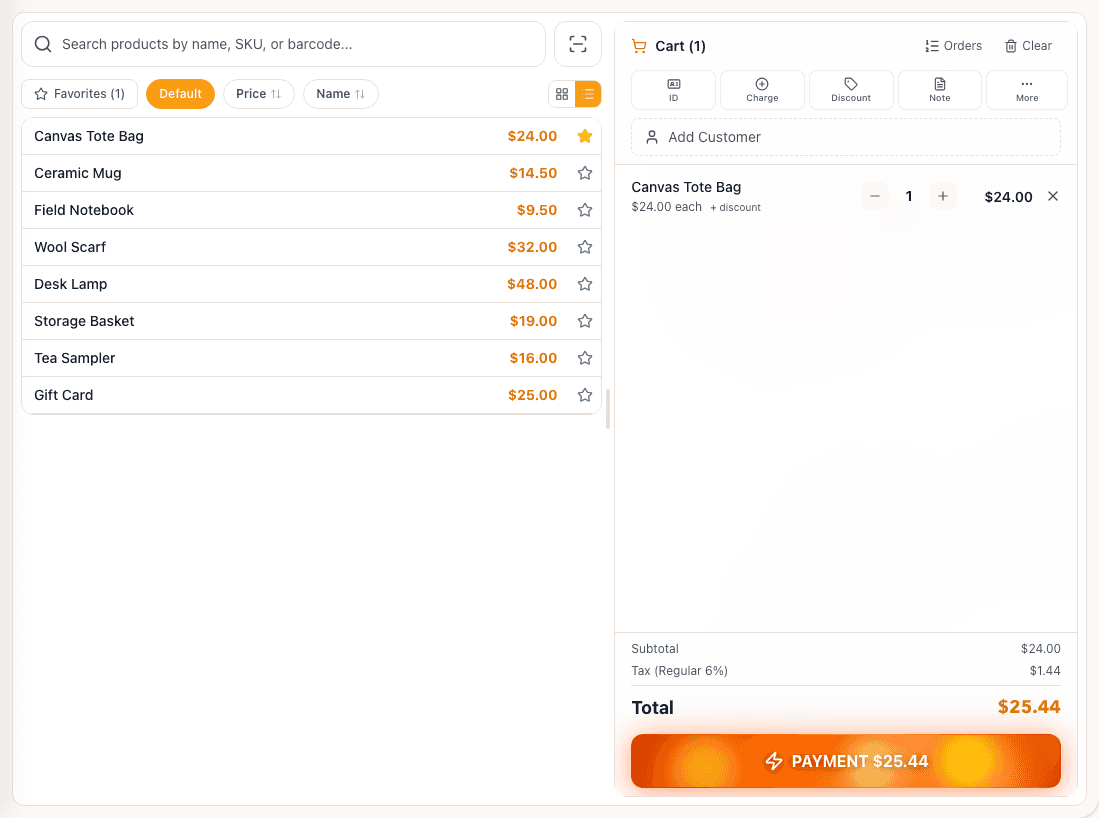
Tillr checkout screen with product list and an active cart.
How it works
Plain steps your team can follow at the counter or in the dashboard.
Pin best sellers and categories to the checkout grid from the dashboard.
Scan barcodes or tap variants to build the cart.
Take split cash and card payments in one sale and send a receipt by text or email.
Shop scenario
A customer brings three items from the rack. Staff scan each barcode, apply a store discount, split payment between card and cash, and hand off a digital receipt.
Questions
Dashboard settings let you configure favorites, categories, and grid layout for your team.
Each variant can carry its own barcode so scanning picks the correct size or color.
Add a few sample products, try the feature, and decide whether it fits your shop.