Can we import a large gift catalog?
CSV and XLSX imports with column mapping are supported. Review rows before they go live.
Inventory Management for gift shops and specialty stores
Gift shops carry cards, candles, decor, and seasonal items in one store. Tillr tracks stock by category, supports barcode lookup, and flags fast movers before shelves go empty.

Common friction
Three problems gift shops and specialty stores run into with inventory management.
Holiday arrivals pile up faster than anyone can relabel the floor.
Similar items sit in different categories, so staff search instead of scan.
You find out a bestseller is gone only when a customer asks for it.
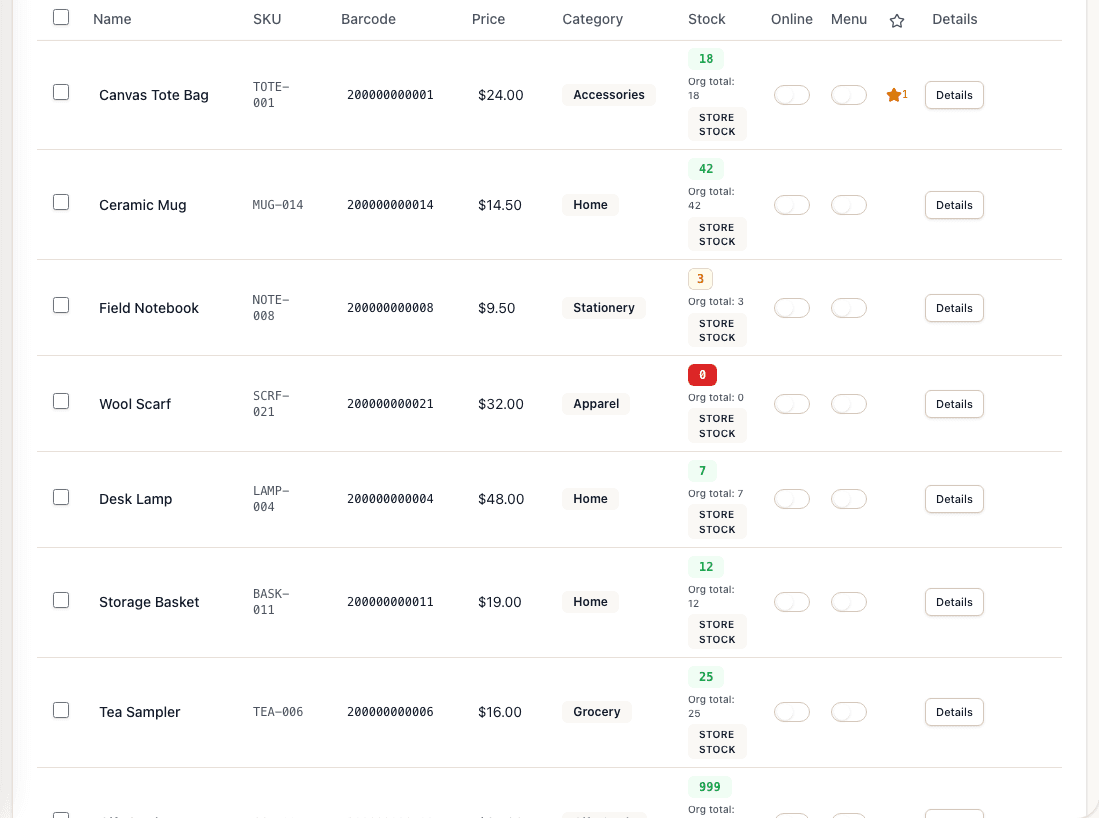
Tillr products list with names, SKUs, stored barcodes, prices, categories, stock counts, and Online and Menu controls.
How it works
Plain steps your team can follow at the counter or in the dashboard.
Import or add products by category so cards, home goods, and seasonal items stay sorted.
Scan barcodes at checkout so stock counts drop on every sale.
Review low-stock alerts before placing the next vendor order.
Shop scenario
Before ordering more candle sets, the owner opens the products list, filters by category, and sees which scents are down to one or two units.
Questions
CSV and XLSX imports with column mapping are supported. Review rows before they go live.
Each scanned sale, return, or adjustment updates the quantity for that product.
Add a few sample products, try the feature, and decide whether it fits your shop.